



Converting your e& physical SIM to an eSIM takes about five minutes, costs nothing, and you never have to visit a store. You do the whole thing from the My e& UAE app, your number stays exactly the same, and the only real requirement is a phone that supports eSIM.
I’ll walk you through the process of setting up an eSIM on your iPhone or Android device using Etisalat, the leading telecommunications provider in the United Arab Emirates.
What you need before you start
- An eSIM-compatible phone – iPhone XR/XS and newer, Samsung Galaxy S20 and newer, most Google Pixel 3 and later, recent Huawei, Oppo, Vivo, OnePlus and Honor flagships. If you’re unsure, Google the model name of your phone to check if it is eSIM compatibile.
- A working internet connection – Wi-Fi is safest, since your mobile data will drop during the switch.
- A fully working e& SIM – e& asks that you’ve made a call, sent an SMS, or used mobile data on the local network.
- UAE Pass or Face Verification – You’ll need one of the two to prove identity. If you don’t have UAE Pass installed, Face Verification works instead, with just a short selfie video.
Step-by-Step: Converting Your Etisalat SIM to an eSIM
Once you have made sure all the above conditions meet, you can begin the process by following this easy step-by-step guide.
Step 1 – Open the My e& UAE app
Log in with your number and you’ll land on the home screen, showing your plan, balance, and usage.
Step 2 – Use the “Set up eSIM” option
Scroll down slightly to the Quick access panel. You’ll see four tiles. The one you want is Set up eSIM, marked with a green “Free” tag. Don’t confuse it with Replace SIM/eSIM next to it as that one is for lost, damaged, or stolen SIMs. Once inside the “Set up eSIM” option, you will get the option to select between Smartphone/Tablet and Apple Watch. Just select Smartphone/Tablet option and tap on continue.
If you cannot see the “Set up eSIM” option there, just tap on the “Show More” option right under the four tiles.
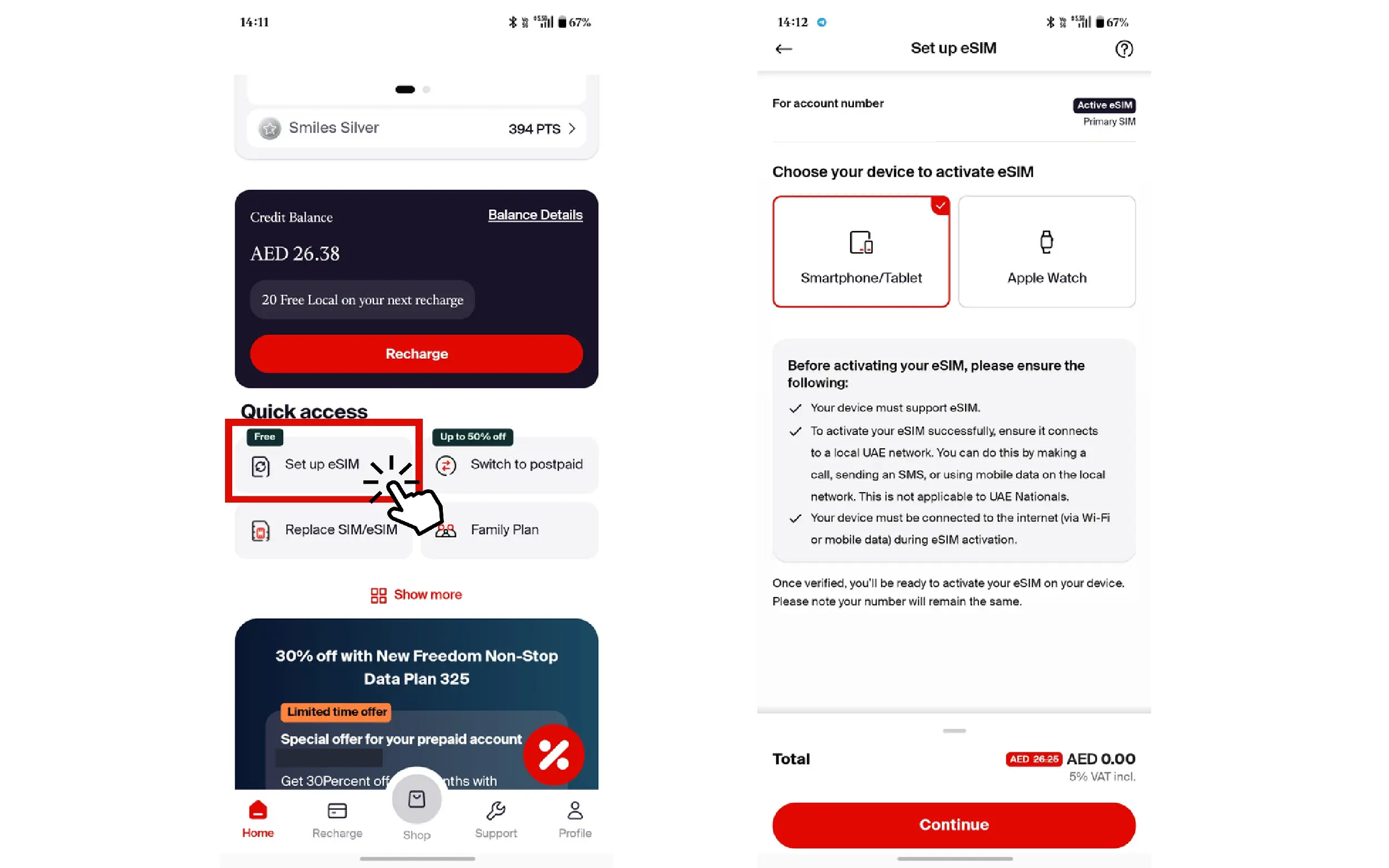
Step 3 – Verify your identity
A panel slides up offering two options:
- Verify with Facial Recognition – A short selfie video recorded in the app
- Login with UAE PASS – Hands off to the UAE Pass app
Either works. UAE Pass is faster if you already have it set up and Face Verification is the fallback if you don’t.
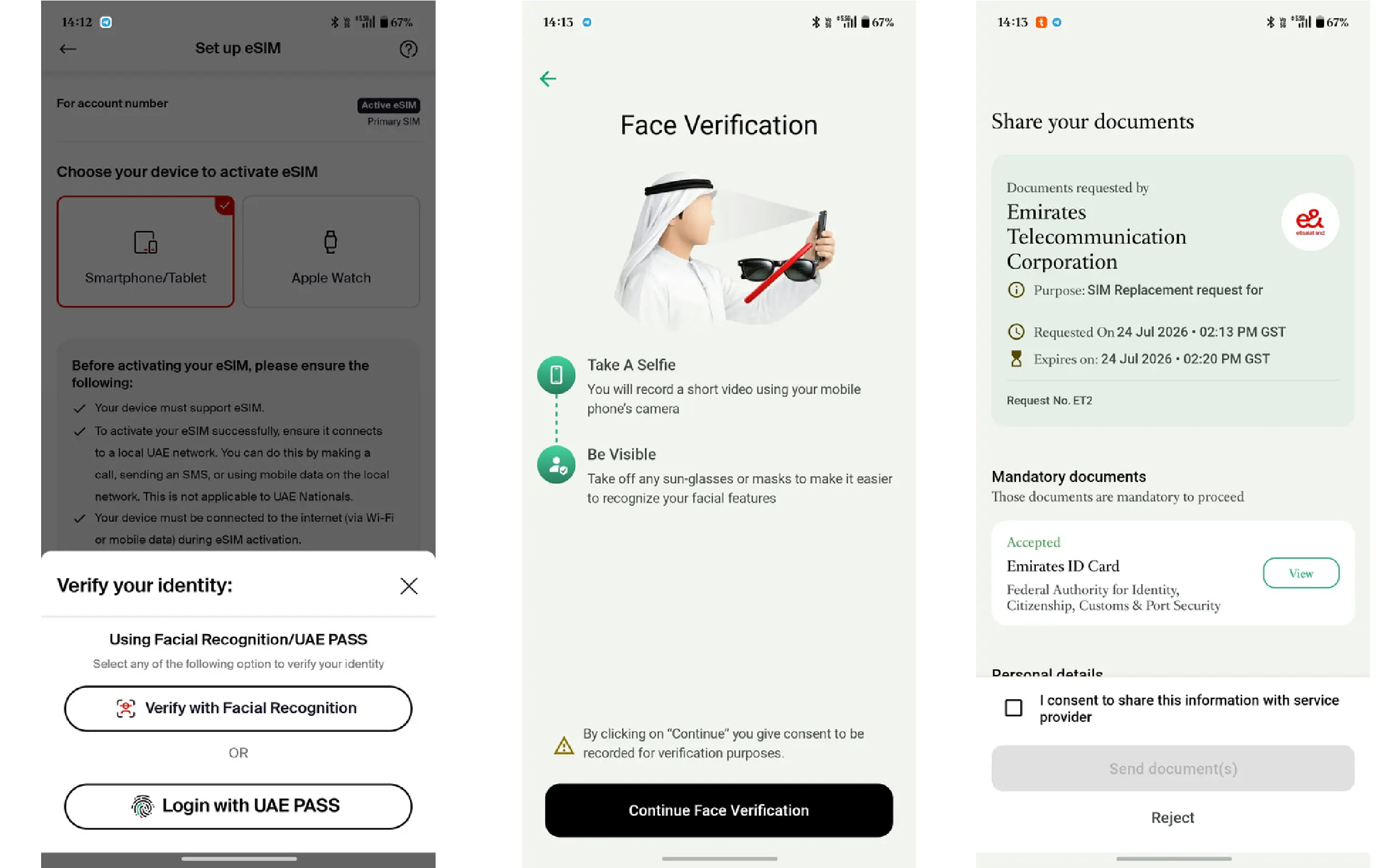
Step 4 – Confirm Everything
Once verification clears, you’ll see Verification complete along with your email address on file. Check it’s correct as this is where your eSIM confirmation goes.
Below that are two checkboxes you must tick:
- Your existing SIM will be disabled and replaced with the new eSIM
- Your device is connected to Wi-Fi to complete the eSIM activation process
Step 5 – Install the eSIM
Once confirmed, e& provisions the eSIM against your number and gives you two ways to install it:
- On the same phone – The app installs the eSIM profile directly. No QR code needed.
- On a different phone – The app shows a QR code. Scan it with the second device’s camera during eSIM setup.
Also Read: How to Activate and Use eSIM on Du: Easy Step-by-Step Guide
How to transfer your Etisalat eSIM to a new phone
Once you’re on an eSIM, moving to a new phone depends on what you’re moving between:
iPhone to iPhone
This one is the easiest as it uses Apple’s built-in eSIM Quick Transfer during setup on the new device. Settings → Cellular → Add eSIM → Transfer From Nearby iPhone. No need to contact e&.
Android to Android
Many recent Samsung and Pixel devices support eSIM transfer during setup. If yours doesn’t offer it, you’ll need to request a new eSIM from the app.
Switching platforms (iPhone to Android, or vice versa)
Transfer isn’t supported cross-platform. Go back into the My e& UAE app and run the eSIM setup again on the new device, using the QR code option.
Which phones support eSIM in the UAE?
Broadly, most flagships from 2018 onwards support eSIM in the UAE. The following are some of the most popular options supporting eSIM in 2026.
Apple – iPhone XR, XS, XS Max and everything after
Samsung – Galaxy S20 series onwards, Z Fold and Z Flip series, Note 20
Google – Pixel 3 and later (models sold in supported regions)
Others – recent Honor, Oppo, Huawei, OnePlus
No More Fees: It’s Free!
Gone are the days when Etisalat charged around AED 25 for eSIM activation. Now, the process is completely free! Plus, you no longer need to visit an Etisalat branch.
On the My Etisalat UAE app, the free sim conversion shows up as a limited-time offer. However, I have been seeing this option available for free for quite some time now. So one can expect this offer to stay for at least the foreseeable future.
